Online editor and free blank downloads
Free Football Team Sheet Template
Prepare your next match online: add players and fixture details, then download or print an A4 team sheet. Save a team to reuse next week, or download a blank, fillable PDF for 5, 6, 7, 9 or 11-a-side. Free, with no account needed.
Prepare this week. Reuse next week.
Edit your team sheet online
Loading browser drafts…
Autosaved in this browser after you edit. Download a backup for another device or browser. Partial sheets are welcome; all nine substitute places are optional.
A4 preview
- TEAM
- Blank
- OPPONENT
- Blank
- MATCH DATE
- Blank
- KICK-OFF
- Blank
- VENUE
- Blank
- COMPETITION / FIXTURE
- Blank
- FORMATION
- 4-3-3
- COACH
- Blank
- CAPTAIN
- Blank
- KIT COLOURS
- Blank
- MATCH NOTES / ROTATIONS
- Blank
- starter 1 name
- Blank
- starter 1 number
- Blank
- starter 1 position
- GK
- starter 2 name
- Blank
- starter 2 number
- Blank
- starter 2 position
- LB
- starter 3 name
- Blank
- starter 3 number
- Blank
- starter 3 position
- LCB
- starter 4 name
- Blank
- starter 4 number
- Blank
- starter 4 position
- RCB
- starter 5 name
- Blank
- starter 5 number
- Blank
- starter 5 position
- RB
- starter 6 name
- Blank
- starter 6 number
- Blank
- starter 6 position
- LCM
- starter 7 name
- Blank
- starter 7 number
- Blank
- starter 7 position
- CM
- starter 8 name
- Blank
- starter 8 number
- Blank
- starter 8 position
- RCM
- starter 9 name
- Blank
- starter 9 number
- Blank
- starter 9 position
- LW
- starter 10 name
- Blank
- starter 10 number
- Blank
- starter 10 position
- ST
- starter 11 name
- Blank
- starter 11 number
- Blank
- starter 11 position
- RW
- sub 1 name
- Blank
- sub 1 number
- Blank
- sub 1 position
- Blank
- sub 2 name
- Blank
- sub 2 number
- Blank
- sub 2 position
- Blank
- sub 3 name
- Blank
- sub 3 number
- Blank
- sub 3 position
- Blank
- sub 4 name
- Blank
- sub 4 number
- Blank
- sub 4 position
- Blank
- sub 5 name
- Blank
- sub 5 number
- Blank
- sub 5 position
- Blank
- sub 6 name
- Blank
- sub 6 number
- Blank
- sub 6 position
- Blank
- sub 7 name
- Blank
- sub 7 number
- Blank
- sub 7 position
- Blank
- sub 8 name
- Blank
- sub 8 number
- Blank
- sub 8 position
- Blank
- sub 9 name
- Blank
- sub 9 number
- Blank
- sub 9 position
- Blank
Checking font coverage and A4 text fit…
The PDF font supports Latin accents, Greek and Cyrillic. Other characters are checked before output. Long text may need shortening to fit legibly; your full draft is retained.
Teams for next week
Keeps the squad, selection, kit, coach and pitch layout. Clears opponent, date, kick-off, venue, competition and both kinds of notes. The previous match stays saved.
Saved matches
Your matches will appear here after editing.
Backup and restore
Backups include matches, named teams, private notes and referenced local badges. Restore adds saved work after review. Download the current edit separately when browser saving is blocked.
Download a blank template
Each download is a one-page, fillable A4 PDF. Print a blank copy or type into the fields in a compatible PDF reader. All versions have nine optional substitute rows.
No sign-up. No player details are needed to download. The row labels show starting places; enter actual shirt numbers in the separate No. column.
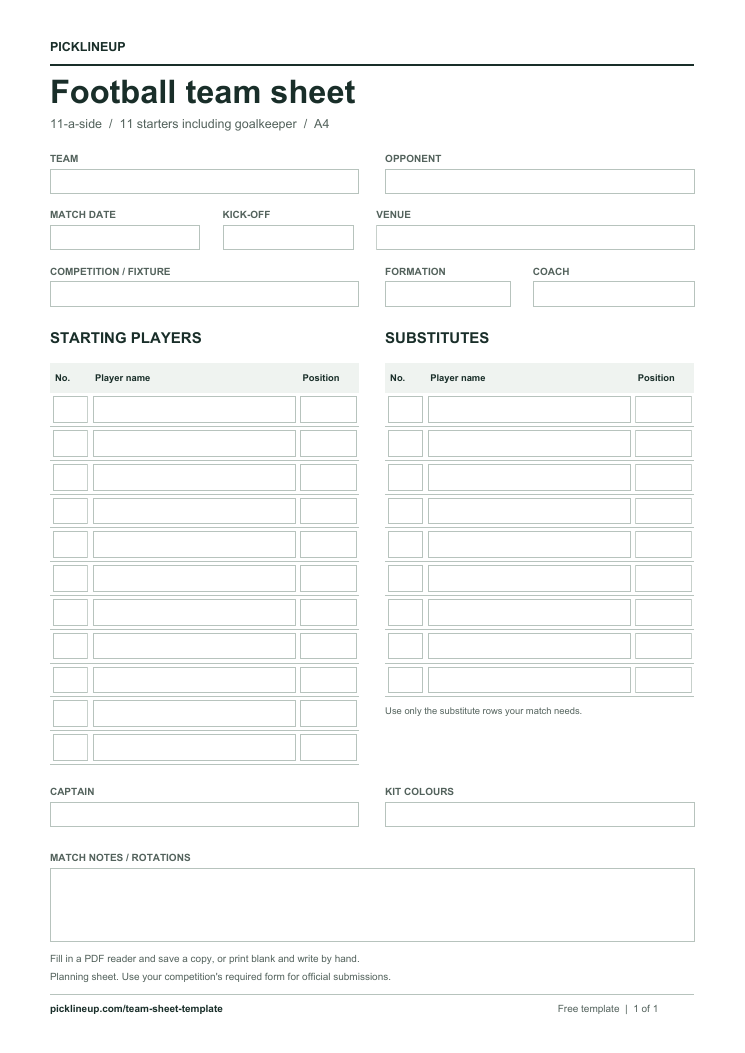
What is in the template?
- Team, opponent, date, kick-off time, venue and competition.
- Formation, coach and captain fields.
- A starting-player table with name, shirt number and position columns.
- Nine optional substitute rows and a notes area.
How to print a blank copy
Download the PDF for your match format and open the saved file. Print in portrait on A4 at actual size, or use Fit to page for another paper size such as US Letter. The light borders and white background also work in black and white.
Edit online and reuse next week
Add your players and match details in the editor above. On a phone, switch between Edit and Preview. Download completed PDF creates a static copy; Print opens the browser print dialog for the sheet alone. Choose A4 portrait and turn browser headers and footers off. You can print the completed PDF if your browser's print settings differ.
Edits are saved in this browser. Save a named team, then choose New match using this team to keep the squad and kit while clearing the fixture and notes. Previous matches remain saved. Download a backup to move your work to another browser or device; restore includes a review and never replaces existing saved work.
Blank downloads also work in a PDF reader that supports fillable forms. Save a copy with a new filename and reopen it to check your entries before sharing or printing.
Make it fit your match
The starter count includes the goalkeeper. Write each player's role in the Position column, mark the captain and use only the substitute rows you need. Nine rows provide writing space; they do not define how many substitutes your competition permits. Use your competition's own form if an official submission is required.
Show the same selection on a pitch
Use “Edit selection on pitch” in the editor to carry your players into the formation maker. Save and return to the A4 sheet with fixture details and notes retained. You can also open the maker below to start a separate formation graphic and download a PNG.
Open the football team sheet maker